Hardware & Software Troubleshooting - Complete Mobile Phone Repair Guide
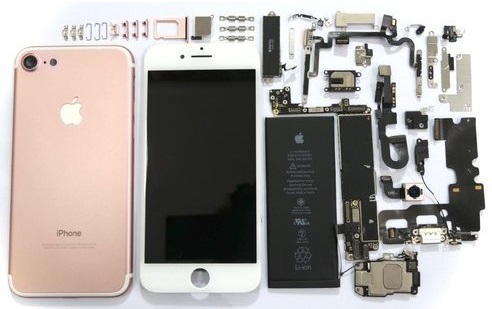
Welcome to the ultimate guide for mobile phone repair. Whether you are a beginner or an experienced technician, this guide will help you understand mobile phone hardware, circuits, and troubleshooting techniques in a clear, step-by-step way.
1. Understanding Mobile Phone Flashing
Flashing is the process of installing new firmware onto a mobile phone’s memory. It is used to repair corrupted firmware, fix constant restarting, freezing, or failure to power on.
Requirements for Flashing
- Computer: A desktop or laptop with USB ports.
- Flashing Device: Hardware that connects your phone to the computer.
- Flashing Software: Provided by the manufacturer or trusted sources online.
- USB and Flashing Cables: Connect the phone and flashing device.
- Firmware Files: Specific to your phone model.

Popular Flashing Devices
Examples include Z3X, Infinity Box, MTK Box, and many others depending on phone brands.
2. Checking Basic Electronic Components
Resistors
Set your multimeter to the Ohm scale. A working resistor shows resistance close to its marked value. Zero resistance indicates shorted, no reading indicates open.
Capacitors
Discharge electrolytic capacitors before testing. On a multimeter, a good capacitor briefly shows deflection towards zero and then returns to infinite resistance.
Diodes
Check forward and reverse resistance. A good diode shows low resistance in one direction, high in the opposite. Both equal readings indicate a fault.
Transistors
Use the multimeter to check NPN or PNP type by measuring resistance between base and emitter/collector. Extreme readings indicate a shorted or open transistor.

LEDs
Use a multimeter on the x1 range; a working LED will glow. No light means a faulty LED.
Coils and Fuses
Coils show near-zero resistance if working. Fuses show continuity; no reading means blown.
3. Audio Circuitry on Mobile Phones
Microphone (Mouthpiece)
Converts sound into electrical signals. Check with a multimeter on resistance; working microphones show a reading.
Earpiece and IHF (Buzzer) Speakers
Convert electrical signals back into sound. Their lines are filtered with inductors and EMI filters to reduce interference.
Vibrator Motor
Although not a sound device, it generates vibration signals and is integrated with the audio codec circuit.

Audio Codec Circuit
The audio codec processes all sound signals: it amplifies, converts, and sends microphone input to RF for transmission, and converts RF signals to audio for speakers.
4. RF Circuit Basics
RF (Radio Frequency) circuits transmit and receive signals. The main components include the RF Receiver (RX), RF Transmitter (TX), power amplifier, antenna, antenna switch, crystal oscillator, and SAW filters. Each part is essential to prevent signal loss.

5. LCD Display Circuits
An LCD (Liquid Crystal Display) converts electrical signals into visual output using pixels and a backlight. It requires:
- Data signals from the application processor
- LED backlight
- Power supply voltage

6. EMI & ESD Protection
EMI (Electromagnetic Interference) and ESD (Electrostatic Discharge) filters protect circuits from unwanted electrical disturbances that could damage components. Many ICs integrate these protections for reliability.

7. Keypad Tracing and Mapping
Tracing mobile phone keypads requires identifying rows and columns from the schematic and mapping them on the PCB using a multimeter.
- Locate keypad section in schematic
- Identify rows and columns
- Trace connections on PCB using X1 resistance setting
- Label each key on PCB or reference sheet

8. Glossary – Mobile Phone Circuit Abbreviations
- ADC: Analog-to-Digital Converter
- RF: Radio Frequency
- MCU: Micro Controller Unit
- EMI: Electromagnetic Interference
- ESD: Electrostatic Discharge
- LED: Light Emitting Diode
- PA: Power Amplifier
- LCD: Liquid Crystal Display
- ...and many more (refer to your glossary for complete list)
Conclusion
This guide covers the essential components, circuits, and troubleshooting techniques used in mobile phone repair. By following the steps for flashing, hardware testing, audio, RF, LCD, LED, and keypad mapping, technicians can efficiently identify and resolve issues across various mobile phone models.
Post a Comment